

You have outgrown your off-the-shelf learning platform, and now the real question is who you trust to build the replacement. The wrong development partner costs you a year and a six-figure budget, so the choice deserves more scrutiny than a sales demo.
Key takeaways
- Build custom when the platform forces your workflows to bend, or when the LMS is the product you sell to clients. In every other case, buy.
- Verify five things in any vendor: domain experience, integrations, security and compliance, scalability, and pricing transparency.
- Budget roughly $50K to $80K for a basic build, $80K to $200K for mid-scope, and $200K to $500K or more for enterprise-grade work over 12 to 24 months.
- Plan for ongoing maintenance at 15% to 25% of build cost per year.
When Should You Build a Custom Enterprise LMS Instead of Buying One?
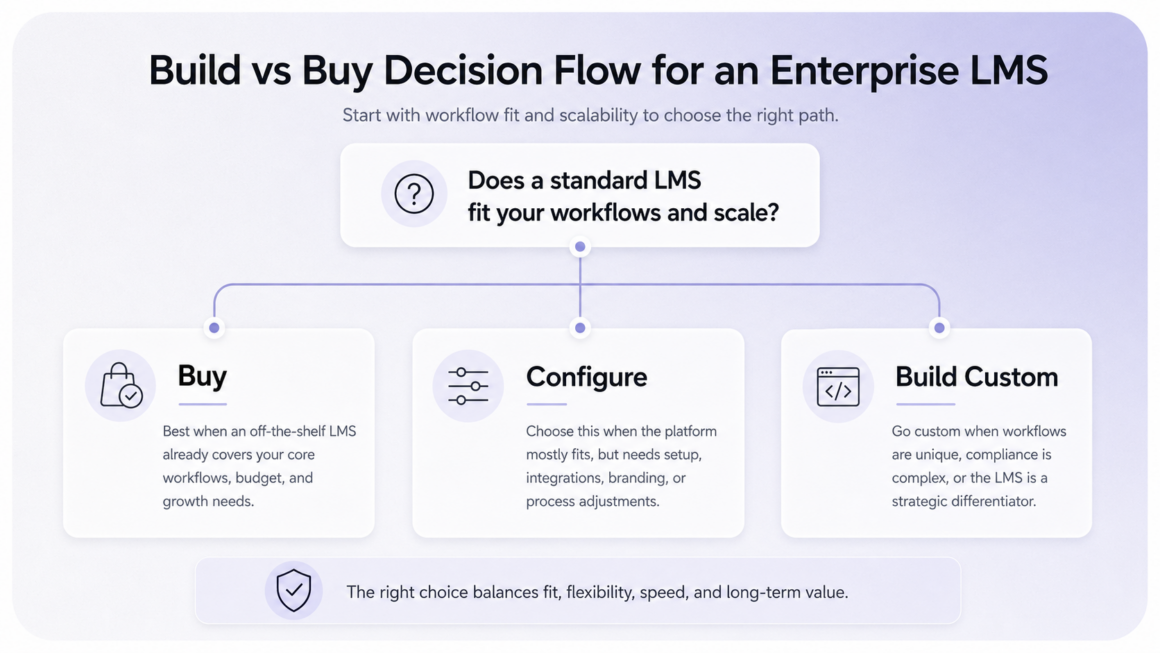
Building a custom enterprise Learning Management System (LMS) means commissioning software shaped around your training model instead of configuring a platform someone else designed. It is the most expensive path you can take, so the rule is narrow: build when an off-the-shelf platform cannot match your workflows, or when the LMS itself is what you sell to clients. Buy in every other case.
Teams that ignore this rule usually discover the cost difference too late, which is why it pays to scope the decision before you start shopping for enterprise LMS development services.
Signs an off-the-shelf platform is holding you back
A platform has outgrown its welcome when you start reshaping how your people work just to fit the tool. Three signs show up again and again:
- You bend your workflows to match the software, rather than the software supporting how your teams already operate.
- Integrations that looked real in the demo turn out to be a once-a-day webhook instead of a live sync.
- You pay for feature bloat your organization will never switch on.
Docebo has documented this exact gap between the polished demo and the day-to-day reality of running the platform.
When the LMS is the product you sell
For a training company, a coding bootcamp, a certification provider, or a paid learning community, the platform is not a back-office tool. It is the thing customers pay for. A white-labeled generic LMS gives you the same experience your competitors can rent by the month, so the build pays off precisely when your learning model is the product and the interface is part of the pitch.
Before you talk to any vendor, it helps to place your own situation on a simple decision path.
 The Enterprise LMS Development Company Checklist: 5 Things to Verify
These five criteria separate a real enterprise build partner from a generic development shop that happens to have one LMS case study. Check each one against evidence you can see, not claims in a sales deck. The order matters less than the discipline of verifying all five before money changes hands.
Proven enterprise LMS and L&D domain experience
Ask to see enterprise LMS work the company has actually shipped at a scale close to yours. Learning and Development (L&D) is a domain with its own failure modes, and a team that has only built generic web apps will rediscover them on your budget.
The stakes are concrete. McKinsey’s 2024 research found that 68% of Chief Human Resources Officers (CHROs) already struggle to connect training to business impact, and a partner without real L&D depth widens that gap instead of closing it.
Integrations with your HRIS, SSO, and content standards
Confirm real support for single sign-on (SSO) and Human Resources Information System (HRIS) synchronization before you sign anything. Then check that the SCORM and xAPI content standards are fully supported, not just listed on a feature page, because integration is where hidden costs hide. Industry build-cost estimates put SSO at roughly $3K to $8K per provider and SCORM or xAPI support at $5K to $15K, and those line items rarely surface in a first quote.
Security and compliance track record
A vendor that says the system “is secure” has told you nothing. Ask for named certifications and the evidence behind each one:
- SOC 2, for controls around data handling and availability.
- ISO/IEC 27001, for a formal information security management system.
- GDPR compliance, for any learners based in the European Union.
- FERPA, if your platform touches student education records.
D2L’s published security criteria are a useful baseline if you want a reference list to check against.
Scalability under real enterprise load
Ask exactly how the architecture handles thousands of concurrent learners spread across regions and time zones. An LMS built like a small-business tool holds up in a demo and then buckles the first time an entire division logs in for mandatory training on the same Monday morning.
Transparent pricing and engagement model
A credible partner answers the budget question with a scope-based estimate and a clear engagement model, not a single round number designed to win the meeting. Vague pricing is not a convenience you sort out later. It is the exact place where a $120K build quietly becomes a $240K one, because every unscoped detail turns into a change request once you are committed.
How Much Does Enterprise LMS Development Cost in 2026?
Cost tracks scope more than anything else, so the useful move is to match your budget to a tier before you ever call a vendor. The sections below break down what each tier of scope buys you, then cover the multipliers that push the number higher and the cost of keeping the system running after launch.
Cost by project scope
Three tiers cover most enterprise builds. Where you land depends on how much custom workflow and integration the system needs.
The table below maps each scope tier to its typical 2026 cost and delivery timeline, and notes the kind of organization it tends to suit.
|
Scope |
Typical 2026 cost |
Timeline |
Best for |
|
Basic build |
$50K–$80K |
3–6 months |
Single-department training with light customization |
|
Mid-scope |
$80K–$200K |
6–12 months |
Multi-team rollout with HRIS and SSO integration |
|
Enterprise-grade |
$200K–$500K+ |
12–24 months |
Global workforce, custom analytics, strict compliance |
Methodology: cost ranges synthesized from published 2026 estimates by AllenComm, Docebo, and Perimattic; timeline and best-fit columns reflect typical enterprise build patterns at each scope tier.
What drives the budget up
Three line items push a build from one tier into the next:
- Integrations. Connecting an HRIS or Student Information System (SIS) alone runs $10K to $30K, and each additional system adds to that.
- Custom analytics. Dashboards that tie learning activity to business outcomes are bespoke work, not a configuration toggle.
- Compliance. Meeting SOC 2 or sector rules such as FERPA adds audit, documentation, and engineering time.
Ongoing maintenance and total cost of ownership
The build cost is the down payment, not the full price. Plan for ongoing maintenance at 15% to 25% of the original build cost every year, covering hosting, security patches, platform updates, and support, per Docebo’s figures.
That annual figure is also what makes the math work at scale. For an organization with 5,000 or more users, a custom build typically breaks even against a $150K-per-year commercial platform within three to four years, after which the cost curve bends in your favor.
Red Flags and Questions to Ask Before You Sign
A polished demo is a sales artifact, not a description of what you will actually receive. The gap between the two shows up in specific places, and a few direct questions bring it into the open before you sign.
Red flags in the sales and demo stage
Watch for three patterns during the pitch:
- Integrations that appear only in slides, never in a live environment you can click through.
- No named support contact for after launch, just a generic “support team.”
- A steady push toward premium features you will not need for two or three years.
Questions that reveal real integration depth
When the conversation gets vague, three questions force a concrete answer:
- “Show me the live integration dashboard.” A real integration has a screen you can open right now. A planned one does not.
- “What exactly is included in the base price?” This surfaces the change requests waiting on the other side of the contract.
- “What does year-two maintenance cost?” The answer reveals whether the vendor has thought past launch day or is selling you only the build.
Conclusion
Choosing an enterprise LMS development company is a verification job, not a leap of faith. Hold each candidate against evidence you can see and a scope-based estimate, and weigh the full cost of ownership over the next three to four years. The checklist turns a confident pitch into a set of claims you can actually check, which is the difference between a partner you chose and one you simply believed.
FAQ
What’s the difference between buying an enterprise LMS and hiring a company to build one?
Buying means licensing a finished platform and configuring it within the limits the vendor set. Hiring a company to build one means commissioning software shaped around your workflows, at a cost that starts near $50K and climbs past $200K for enterprise scope. You buy for speed and a lower entry price; you build when the platform itself has to fit you rather than the other way around.
How long does it take to build a custom enterprise LMS?
Between three and twenty-four months, depending on scope. A basic single-department build lands in the three-to-six month range, a mid-scope rollout in six to twelve, and a full enterprise-grade system with custom analytics and compliance work in twelve to twenty-four.
What should an enterprise LMS development contract include?
A contract worth signing names the specifics rather than gesturing at them. Make sure it includes:
- A scope-based estimate tied to defined deliverables, not a single lump sum.
- Named integrations with acceptance criteria for each one.
- A maintenance and support agreement with year-two costs stated up front.
- Ownership of the intellectual property and source code, in writing.
Do I need SCORM and xAPI support in a custom LMS?
In almost every case, yes. SCORM and xAPI are the standards that let your courses move between systems, so unless you are certain you will never import existing content or report to another platform, treat both as non-negotiable from the first version.
How do I verify a vendor’s security and compliance claims?
Start by asking for the actual reports, not the claims. A vendor with SOC 2 can hand you the audit report under a non-disclosure agreement, and one with ISO/IEC 27001 can show the certificate and its scope. If a candidate answers either request with a brochure instead of a document, treat that as your answer.